Bluebono

A PLATFORM FOR LENDING OPERATIONS
Bluebono Portal is the B2B platform a mortgage lender and its partner companies use to run a loan from application to closing. Everyone works from one shared system of record, and each party — in-house or external — sees only the part of it their role is responsible for.
A loan is a relay, and it is rarely run by one company. The file moves between a Loan Officer, a Processor and a Closer, then out to escrow, title and insurance. Everyone needs the same record — and almost nobody should see all of it.
Worked with three other designers on the UX — the way roles are structured, the core flows, the information architecture. Led the UI from there, including the system-level patterns and the component library the product is built from.
Account setup, roles and permissions, users and companies, the loan workspace, document review and profile settings — the core of the platform.
One file, many owners.
A loan follows a fixed path — scenario, submission, KYC — then fans out into five parallel tracks before converging on funding and servicing.
Different roles own different tracks, but everyone shares one file. The lifecycle bar sits above every loan — the one view every role reads the same way.

Nobody signs themselves up.
Access starts with an invitation, not a sign-up. By the time an account exists, it already belongs to a company and carries a role.


Permissions, written as responsibilities.
Roles come in two families: business roles — Loan Officer, Processor, Closer — and system roles for administration. Each one is described in the language of the job rather than as a list of permission toggles.
Admins can add roles, group them into levels — named bundles that can be granted in one step — and switch them on or off as new partner companies join.


Where overlapping roles become visible.
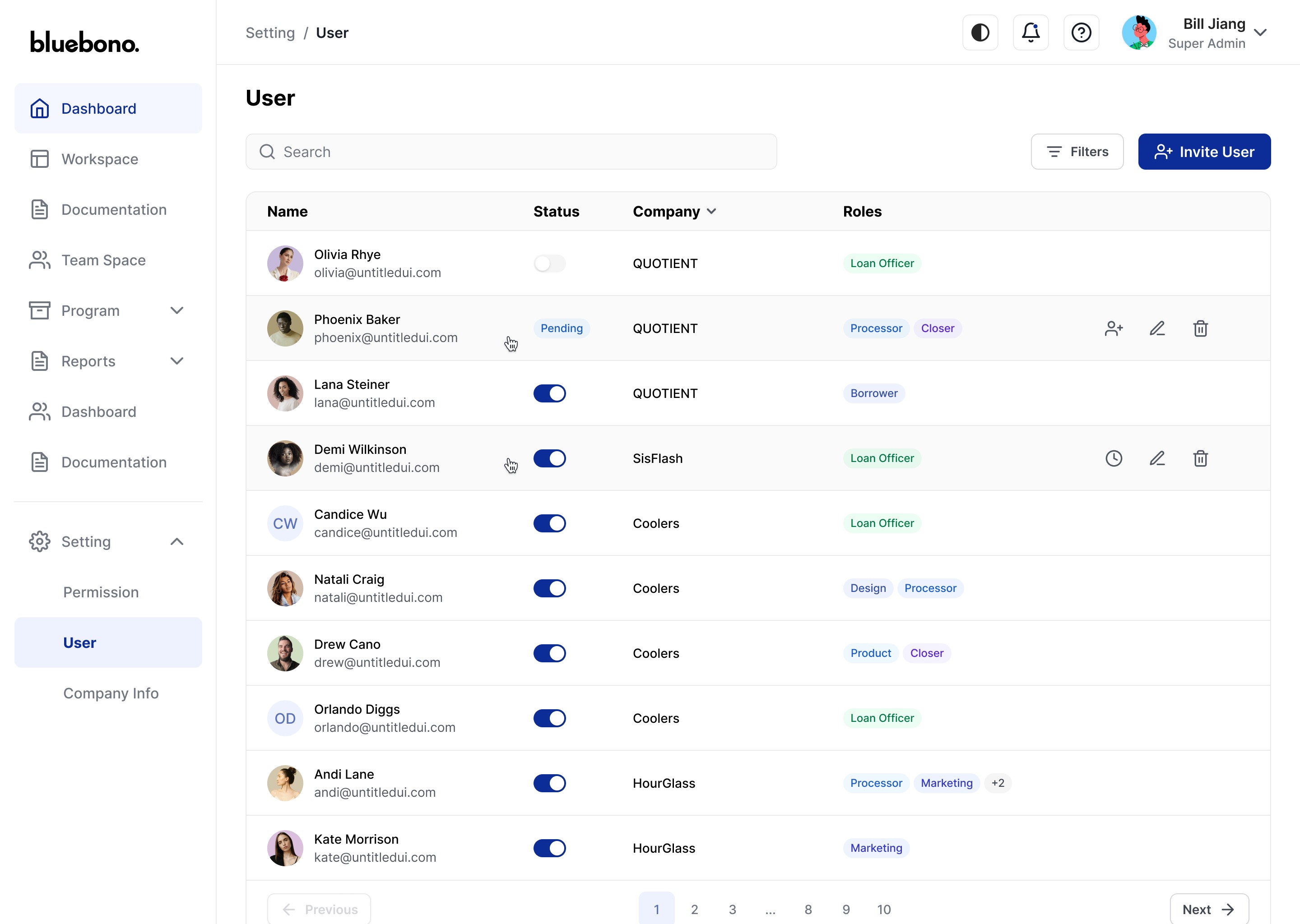
One person, one company, and however many roles they hold at once — the table puts the overlap in plain sight instead of leaving it buried in a profile.
Companies are onboarded separately, and each is placed at a level that sets how far across the network it can reach. Across that network one rule holds: partners see each other's records, never each other's staff.
The same module is designed twice — once for a Super Admin, once for a Company Admin — because the two roles are doing different work.


Progress per track, not per loan.
Every loan opens on its lifecycle, then breaks into the tracks that make it up. A key-info bar — borrower, property, amount, purpose — stays visible wherever you go inside the file.
Each track reports its own progress, so the number in front of you points to what still needs doing rather than to how far along the loan is overall.
A right rail keeps the calendar, milestones, the loan's team and its message thread within reach — the team list covering colleagues and outside parties alike, since a loan is rarely handled by one company.


A document is more than a file.
Every document carries who uploaded it, when, and what state it's in — pending, approved, rejected — because one person uploads and another reviews.
The same set reads as a table while you're processing it and as cards while you're reviewing it. Approvals, comments and requests all land in the loan's message thread, so the record and the conversation stay together instead of drifting into email.


Which role am I in right now?
Personal settings live on their own page rather than in an overlay, with room for preferences, the roles you hold, and your level.
The header menu is where you confirm which role you're currently in, and where notification settings live.


Every state, decided once.
The component spec from the source file, rebuilt at the same values — Inter, a 44px field, an 8px radius, a 4px focus ring, and one settled answer for every state a control can be in.
 Tap to open at full size
UI/UX DESIGN · FREELANCE
Bluebono
Bluebono
Portal Design
Portal Design
COMPANY
Bluebono
DURATION
May 2025 - Sep 2025
PRODUCT
B2B Lending Platform
ROLE
UI/UX Designer

01 OVERVIEW
A PLATFORM FOR LENDING OPERATIONS
Bluebono Portal is the B2B platform a mortgage lender and its partner companies use to run a loan from application to closing. Everyone works from one shared system of record, and each party — in-house or external — sees only the part of it their role is responsible for.
THE CHALLENGE
A loan is a relay, and it is rarely run by one company. The file moves between a Loan Officer, a Processor and a Closer, then out to escrow, title and insurance. Everyone needs the same record — and almost nobody should see all of it.
MY CONTRIBUTION
Worked with three other designers on the UX — the way roles are structured, the core flows, the information architecture. Led the UI from there, including the system-level patterns and the component library the product is built from.
SCOPE
Account setup, roles and permissions, users and companies, the loan workspace, document review and profile settings — the core of the platform.
02 THE LIFECYCLE
One file, many owners.
A loan follows a fixed path — scenario, submission, KYC — then fans out into five parallel tracks before converging on funding and servicing.
Different roles own different tracks, but everyone shares one file. The lifecycle bar sits above every loan — the one view every role reads the same way.
03 GETTING IN
Nobody signs themselves up.
Access starts with an invitation, not a sign-up. By the time an account exists, it already belongs to a company and carries a role.
04 ROLES & PERMISSIONS
Permissions, written as responsibilities.
Roles come in two families: business roles— Loan Officer, Processor, Closer — and system roles for administration. Each one is described in the language of the job rather than as a list of permission toggles.
Admins can add roles, group them into levels — named bundles that can be granted in one step — and switch them on or off as new partner companies join.
05 USERS & COMPANIES
Where overlapping roles become visible.
One person, one company, and however many roles they hold at once — the table puts the overlap in plain sight instead of leaving it buried in a profile.
Companies are onboarded separately, and each is placed at a level that sets how far across the network it can reach. Across that network one rule holds: partners see each other’s records, never each other’s staff.
The same module is designed twice— once for a Super Admin, once for a Company Admin — because the two roles are doing different work.
06 THE LOAN WORKSPACE
Progress per track, not per loan.
Every loan opens on its lifecycle, then breaks into the tracks that make it up. A key-info bar — borrower, property, amount, purpose — stays visible wherever you go inside the file.
Each track reports its own progress, so the number in front of you points to what still needs doing rather than to how far along the loan is overall.
A right rail keeps the calendar, milestones, the loan’s team and its message thread within reach — the team list covering colleagues and outside parties alike, since a loan is rarely handled by one company.
07 DOCUMENTS & REVIEW
A document is more than a file.
Every document carries who uploaded it, when, and what state it’s in — pending, approved, rejected — because one person uploads and another reviews.
The same set reads as a table while you’re processing it and as cards while you’re reviewing it. Approvals, comments and requests all land in the loan’s message thread, so the record and the conversation stay together instead of drifting into email.
08 PROFILE & CURRENT ROLE
Which role am I in right now?
Personal settings live on their own page rather than in an overlay, with room for preferences, the roles you hold, and your level.
The header menu is where you confirm which role you’re currently in, and where notification settings live.
09 DESIGN SYSTEM
Every state, decided once.
The component spec from the source file, rebuilt at the same values — Inter, a 44px field, an 8px radius, a 4px focus ring, and one settled answer for every state a control can be in.
COLOR · VARIABLES
52
Brand-y
Primary action, selected state, focus ring
Gray
Text, borders, surfaces, disabled states
Success
Approved documents, confirmation dialog
Warning
Pending review, unsaved-changes dialog
Error
Rejected documents, invalid fields, destructive dialog
Accent
Category badges and dashboard charts
